Here's the problem: most business leaders use "app development" and "iOS development" interchangeably. They're not the same thing, and that confusion costs time and budget once a project is already underway.
This guide breaks down what iOS development actually involves, how the build process works, what it costs, and how to pick a development partner who won't leave you stuck mid-project.
Key Takeaways
- iOS app development builds apps exclusively for Apple's ecosystem in Swift or Objective-C
- Build lifecycle: discovery, design, coding, TestFlight testing, and App Store review
- Native development suits performance-critical apps; cross-platform frameworks suit speed and budget
- Costs vary based on complexity, team structure, and hiring model: in-house, freelance, or outsourced
What Is iOS App Development?
iOS app development is the process of building software exclusively for Apple's operating system and hardware. Unlike Android development or cross-platform builds, an iOS app is designed, coded, and optimised for Apple's devices from the ground up.
Two languages dominate this space:
- Swift – Apple's modern language, used across all its platforms and capable of building an entire app on its own
- Objective-C – the legacy language, still maintained in older codebases and interoperable with Swift where needed
Apple's own developer documentation confirms Swift and Objective-C can coexist in the same project, which matters if you're inheriting an older app rather than starting fresh.
iOS apps typically run across a shared codebase spanning iPhone, iPad, Apple Watch, and Apple TV. Build once with the right architecture, and you can extend the same app to a watch face or a living-room screen without starting over.
Types of iOS Apps Businesses Commonly Build
Business and productivity software makes up a significant slice of the App Store. Business represented 10.11% of all available apps in Q2 2024, according to Statista's 2024 App Store category data, just ahead of Utilities and Education.
Common business builds include:
- Legal case-management tools that handle client records and matter tracking on the move
- Finance dashboards giving leadership real-time visibility into performance metrics
- Marketing analytics apps that surface campaign data outside the office
- Retail, healthcare, and on-demand service apps built for direct consumer use
That breadth carries real weight. A finance dashboard has very different compliance and data-handling needs than a retail app, and that shapes everything from architecture to App Store review scrutiny.
The iOS App Development Process Step by Step
Every serious iOS build follows roughly the same sequence, though the depth of each stage depends on complexity.
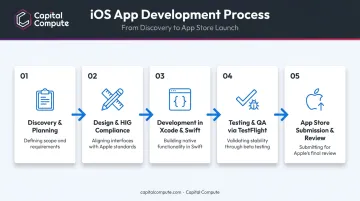
Discovery & Planning
This phase defines scope, target users, and core features. It's also where architecture decisions get locked in, not revisited later.
For Australian businesses, this stage should cover:
- Data-flow mapping for how personal information moves through the system
- Consent architecture, so lawful basis for data processing is built in from day one
- Data minimisation planning, limiting collection to what's actually needed
- Subject access request readiness, so the app can respond to individual rights requests without a rebuild
Skipping this step is how projects end up bolting on the Privacy Act compliance after launch, which is far more expensive than designing for it upfront.
Design (Following Apple's Human Interface Guidelines)
Apple enforces its Human Interface Guidelines across every app submitted for review. These cover accessibility, layout, colour, typography, and interaction patterns.
This isn't optional polish. An app that ignores HIG standards risks rejection during App Store review, so design decisions need to account for these rules from the first wireframe, not as a retrofit before submission.
Development (Xcode, Swift, SwiftUI)
Engineers build in Xcode, Apple's official development environment, using SwiftUI or UIKit to construct interfaces and connect backend services. This is where APIs get integrated, data models take shape, and the app starts behaving like software rather than a prototype.
Cross-platform teams, including engineers at Capital Compute, sometimes add a native Swift layer at this stage for performance-heavy features like camera processing or real-time sync, while keeping the rest of the app on a shared codebase.
Testing & Quality Assurance
Apple's TestFlight tool handles beta distribution before public release. It supports:
- Up to 100 internal testers via App Store Connect
- Up to 10,000 external testers
- Builds that remain live for up to 90 days before expiring
Alongside TestFlight, Xcode includes automated unit and UI testing tools, letting teams catch regressions before a human tester ever opens the app.
App Store Submission & Review
According to Apple's App Review page, 90% of app submissions are reviewed in under 24 hours, though incomplete submissions can face delays. Multiple rejection-revision cycles are common, especially for apps handling payments, health data, or in-app purchases.
Two costs catch businesses off guard here:
- The annual Apple Developer Program fee, which applies regardless of app complexity
- A 30% commission on App Store sales of digital goods (dropping to 15% for developers under the Small Business Program, generally capped based on prior-year proceeds)
Native vs. Cross-Platform iOS Development: Which Should You Choose?
This is the decision that shapes your entire budget and timeline, so it deserves more than a gut call.
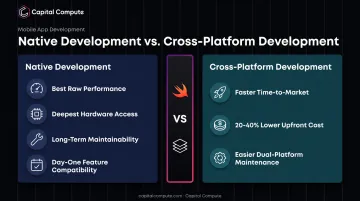
Native development (Swift or Objective-C) delivers:
- The best raw performance and deepest access to device hardware
- Long-term maintainability for complex, feature-heavy apps
- Full compatibility with every new Apple feature on day one
Cross-platform frameworks (React Native, Flutter) deliver:
- Faster time-to-market by sharing one codebase across iOS and Android
- Lower upfront cost, with GoodFirms reporting cross-platform builds running 20-40% cheaper than native builds at comparable complexity
- Easier maintenance when you're supporting two platforms with one team
Neither option is universally "better." A high-frequency trading dashboard needing millisecond responsiveness has different needs than an internal staff scheduling tool.
This is where a flexible build model earns its keep. Capital Compute builds cross-platform by default, then adds a native performance layer in Swift only where the use case genuinely demands it, such as camera-heavy features or Bluetooth device pairing.
That keeps architecture matched to actual need, rather than forcing every project into native builds "just in case."
How Much Does It Cost to Develop an iOS App?
Cost depends on five main drivers:
- App complexity and number of core features
- Number of screens and navigation depth
- Backend infrastructure requirements
- Third-party integrations (payment gateways, CRMs, APIs)
- Design polish and custom UI work
A Clutch survey of 158 US small businesses with a live mobile app found spending broke down like this:
| Reported Spend | Share of Businesses |
|---|---|
| $10,000 or less | 33% |
| $10,001–$30,000 | 20% |
| $30,001–$50,000 | 14% |
| $50,001–$100,000 | 16% |
| More than $100,000 | 16% |
Note this is mobile-wide spending, not native-iOS-only, and reflects US small-business budgets rather than Australian figures. Still, the spread tells you something useful: many Australian budgets land under the A$25,000 mark for a simple app, though complex or regulated builds push well past that threshold.
Who builds your app moves these numbers as much as the feature list does.
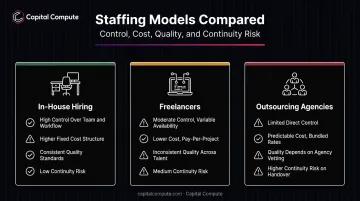
Three ways to staff a build:
- In-house hiring – highest control, but salary plus overhead adds up fast, especially for a single hire covering multiple specialisms
- Freelancers – cheaper hourly rates, but variable quality and continuity risk if they move on mid-project
- Outsourcing agencies – structured delivery, shared accountability, and (with the right agency) fixed pricing instead of open-ended hours
Whichever route you choose, budget for costs that rarely show up in the initial quote.
Hidden costs businesses often miss:
- The annual Apple Developer Program membership fee
- Post-launch maintenance and bug fixes
- App Store optimisation to actually get found
- The Privacy Act or sector-specific compliance work for regulated industries
Fixed-price, milestone-based delivery reduces the risk of budget creep compared to open-ended hourly billing. Capital Compute structures engagements in fortnightly sprints, each scoped and agreed in writing before work starts, with clients only invoiced once that sprint's deliverables are approved.
Choosing the Right iOS App Development Partner
Before signing anything, ask potential partners:
- Is the work done in-house, or subcontracted to a third party you'll never speak to?
- Do they build native Swift apps, cross-platform apps, or both for your use case?
- Is the Privacy Act compliance built into the architecture from day one, or reviewed just before launch?
- What happens after handover? Is there ongoing dependency, or can you walk away cleanly?
Continuity matters more than most businesses expect. If the engineers who built your app aren't around for the retainer phase, you're paying someone new to relearn a codebase they didn't write, which slows every fix and feature request.
Capital Compute works with an internal engineering team only, with no subcontracting at any stage, and builds both native Swift and cross-platform apps depending on project needs. APP-compliant architecture gets scoped during discovery, not patched in later.
Once the initial 90-day post-launch support window ends, clients can move to a month-to-month retainer with no long-term lock-in. This flexibility particularly suits Australian SaaS founders and regulated-sector clients who need continuity without commitment. Start that conversation through Capital Compute's contact page.
Frequently Asked Questions
How much does it cost to develop an iOS app?
Costs vary widely based on complexity, features, and team structure. Most small business projects fall under A$25,000, though complex or regulated apps often exceed that.
How long does it take to develop an iOS app?
Mobile app timelines typically run 20-40 weeks, depending on screen count and feature complexity. A simple app with fewer than 10 screens moves faster than one requiring offline support, notifications, or multi-device sync.
Do I need a Mac to develop an iOS app?
Yes. Xcode, Apple's development environment, only runs on macOS, making a Mac a hard requirement for any iOS build.
What's the difference between iOS and Android app development?
iOS uses Swift or Objective-C with Apple's strict review process; Android uses Kotlin or Java with more device fragmentation across manufacturers. Both require different design guidelines and testing approaches.
Can an existing Android app be converted into an iOS app?
Code isn't directly portable between platforms. However, design decisions and business logic can be reused to speed up a parallel native or cross-platform iOS build.
Is Swift better than Objective-C for new projects?
Swift is the modern standard for new Apple development, capable of building an entire app independently. Objective-C is mainly reserved for maintaining existing legacy codebases.