For Australian SaaS founders and firms in legal, finance, and marketing, the pain point isn't just inefficiency. It's finding a way to build apps that scale, stay secure, and remain APP-compliant, without signing up for years of dependency on a single vendor.
This guide covers what enterprise mobile apps actually are, the types available, the benefits worth the investment, the features you can't skip, and how to pick a development partner that reduces risk rather than adding to it.
Key Takeaways
- Enterprise apps prioritise internal security and integration depth over consumer engagement
- Flutter and React Native now cover most enterprise apps, with native Swift/Kotlin reserved for performance-critical builds
- Scope the Privacy Act architecture and role-based security before development starts, not after
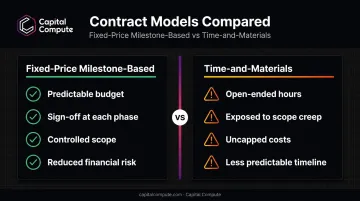
- Fixed-price, milestone-based contracts reduce financial risk versus open-ended time-and-materials engagements
What Is Enterprise Mobile App Development?
Enterprise mobile app development means building internal-facing software for employees and business operations, not consumer entertainment or e-commerce. Think apps that run payroll, manage field technicians, or give sales teams live customer data, rather than apps built to keep someone scrolling.
The distinction matters more than it sounds. Enterprise apps are judged on operational value, not download numbers.
Enterprise Apps vs. Consumer Apps
| Dimension | Enterprise App | Consumer App |
|---|---|---|
| Purpose | Productivity, internal workflows | Engagement, entertainment, retail |
| Security depth | MFA, role-based access control (RBAC), encryption | Basic login, minimal permissions tiers |
| Integration needs | ERP/CRM connectivity, internal system sync | Mostly standalone |
A few concrete examples make this real:
- HR app: tracks payroll, leave requests, and performance reviews for internal staff
- CRM app: puts live customer data in sales teams' hands on-site, synced with the back-office system
- Field service app: technicians log completed work, capture signatures, and update job status directly from the site
None of these need to entertain anyone. They need to work reliably, protect sensitive data, and connect to systems the business already runs on.
Types of Enterprise Mobile Applications
Enterprise mobile apps split into two useful categories: what the app does for the business, and what technology it's built with. Both decisions shape cost, timeline, and long-term flexibility.
Major Types of Enterprise Applications
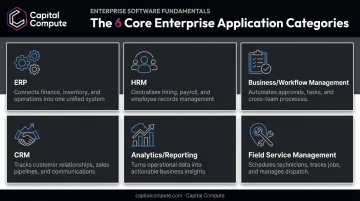
Most enterprise software falls into a handful of functional categories:
- ERP (Enterprise Resource Planning) — consolidates finance, inventory, and sales into one connected back-office view
- HRM (Human Resource Management) — handles payroll, recruitment, and performance tracking
- Business/workflow management apps — coordinate approvals, task assignment, and internal processes
- CRM (Customer Relationship Management) — manages customer data and customer-facing activity in one place
- Analytics/reporting apps — turn raw data into dashboards and KPIs teams can act on
- Field service management apps — coordinate technicians and resources working away from company premises
According to Eurostat's 2023 survey, large European enterprises adopt far more of these application types than smaller ones. ERP usage ranged from 38% among small enterprises to 86% among large ones, with CRM adoption climbing from 22% to 61% over the same size range.
The same pattern holds for Australian businesses. Most growing enterprises end up needing several of these functions at once, which is precisely why off-the-shelf tools often fall short and custom builds win out.
Four Main Types of Mobile Applications
Once you know what the app needs to do, you choose how it's built:
- Native apps — built with Swift for iOS or Kotlin for Android, giving direct access to device hardware and the best possible performance. Ideal for demanding use cases like warehouse scanning or camera-heavy field work.
- Web apps — browser-based, no install required. Fast to update, but limited in device access and dependent on network connectivity.
- Hybrid apps — a single codebase wrapped in a native container. Faster to build than native, but with some performance trade-offs.
- Cross-platform apps — built with Flutter or React Native, sharing one codebase across iOS and Android while staying close to native performance.
Cross-platform has become the default enterprise choice because it balances speed-to-market against performance. Capital Compute builds most client apps on this stack, with native Swift or Kotlin available for the specific screens or features where raw performance is non-negotiable.
Key Benefits of Enterprise Mobile App Development
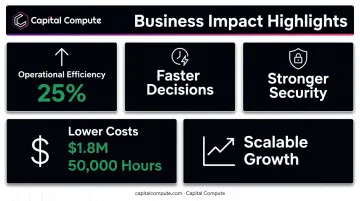
The case for investing in a proper enterprise app comes down to five measurable outcomes:
- Operational efficiency: Real-time data on mobile removes the delays baked into paper forms and end-of-day entry. A bespoke internal system built to integrate mobile barcode scanners with an existing ERP can significantly increase warehouse productivity while virtually eliminating manual-entry errors.
- Faster decisions: Real-time analytics let managers spot problems as they happen rather than reviewing yesterday's numbers tomorrow morning.
- Stronger security: Encryption, multi-factor authentication, and role-based access reduce the attack surface. The OAIC recommends applying strong multi-factor authentication for any system handling sensitive data — a standard that matters most for Australian legal and finance firms under regulatory scrutiny.
- Lower costs: Rogers-O'Brien reported saving 50,000 hours through paperless workflows and roughly $1.8 million in printing costs after moving to a mobile-first process, an outcome that translates well for any business drowning in manual admin.
- Scalable growth: A SaaS architecture absorbs more users, more data, and new integrations without the app buckling under its own success.
Essential Features Every Enterprise Mobile App Needs
Skip any of these, and you're building technical debt into version one.
- Multi-factor authentication and role-based access control: restrict what each user role can see and do, following NIST's RBAC model for structuring these permissions correctly.
- Documented, versioned APIs: connect the app to existing ERP, CRM, and internal systems without creating new data silos. The Australia's Government Digital Service recommends specification-first documentation with clear versioning, so integrations don't break when systems change.
- Offline functionality and automatic sync: field and remote staff keep working without a signal, with data queued locally and synchronised the moment connectivity returns.
- Push notifications and real-time alerts: keep distributed teams aligned on approvals, task updates, and deadlines without relying on email.
- APP-compliant data architecture scoped from day one: built into the data model during discovery, not bolted on after launch.
That last point carries real financial weight.
The maximum civil penalty under the Privacy Act 1988 is the greater of A$50,000,000, three times the benefit obtained, or 30% of adjusted turnover, whichever is highest.
Retrofitting compliance after launch is far riskier, and often far more expensive, than architecting for it during discovery.
Common Challenges in Enterprise Mobile App Development
Even well-planned projects run into predictable friction points.
Legacy system integration is usually the first wall you hit. Connecting a new mobile app to a decade-old back-end system requires a proper technical feasibility assessment before a single sprint begins, not halfway through development when the surprises get expensive.
Compliance risk doesn't forgive late reviews. Australian businesses in regulated sectors need Privacy-First architecture baked in from discovery, not a compliance audit tacked onto the end of the project timeline.
User adoption often disappoints post-launch. Device and OS fragmentation adds another layer of risk: Android alone spans multiple active OS versions across the install base, so an app that works perfectly on one device can misbehave on another.
Intuitive design and genuine cross-device testing aren't optional extras. They're what determines whether the app actually gets used six months after go-live.
Choosing the Right Development Partner
The technology choices matter, but the partner you choose determines whether the project stays on budget and on time.
Fixed-price scoping with milestone approval gates reduces risk. Open-ended time-and-materials contracts leave enterprise budgets exposed to scope creep, since hours can expand without a corresponding cap on cost. Agreeing fixed-price sprints in phases, with sign-off at each milestone, controls both budget and timeline far better than a single rigid whole-project quote.
Pricing structure isn't the only factor. An internal engineering team beats a subcontracted one. When the same engineers who scope the architecture also build it, decisions made in sprint one stay consistent through delivery.
Capital Compute structures Australian engagements this way. Senior engineers join from the first discovery conversation through deployment, with fortnightly sprint reviews held in Australian business hours so nothing drifts unnoticed.
Team structure matters, but the real test comes after launch. Avoid long-term lock-in. A good partner hands over:
- Documented, versioned APIs
- Clean, maintainable code
- Full IP ownership
This means your internal team retains complete control once the project closes, rather than depending on the vendor for every future change.
Frequently Asked Questions
What is an enterprise mobile application?
It's internal-use software built for an organisation's employees to run business functions like HR, sales, or field operations, distinct from customer-facing consumer apps designed for entertainment or retail.
What are the major types of enterprise applications?
The primary categories are ERP, CRM, HRM, and analytics/reporting apps, each organised around a core business function like finance, sales, staffing, or decision-making data.
What are the four main types of mobile applications?
Native, web, hybrid, and cross-platform apps. Native offers the best performance, web is easiest to update, hybrid balances the two, and cross-platform (Flutter, React Native) is the common enterprise choice.
How much does enterprise mobile app development cost?
Cost depends on complexity, platform choice, number of integrations, and where the development team is based. Fixed-price scoping is the safest way to control budget risk before work begins.
How long does it take to build an enterprise mobile app?
Timelines vary by scope, but discovery typically runs several weeks before design, development, QA, and deployment follow in sprints. Sprint-based delivery with fortnightly reviews helps shorten time-to-value.
Do enterprise mobile apps need to be APP compliant?
Yes. Any app handling Australian or EU personal data must comply with the Privacy Act. Architect this compliance during discovery, not as a retrofit before go-live, to avoid costly rebuilds and enforcement risk.