Introduction
Australian small businesses are caught in a familiar bind: operational demands grow, but headcount and budgets don't stretch to match. Staff recruitment and skills shortages remain a persistent obstacle for SME employers — and that pressure hasn't eased.
AI automation offers a practical way forward. It removes the repetitive, rule-based tasks that consume hours every week — freeing your team to focus on work that requires human judgement.
This guide covers what AI automation services involve for small businesses, which use cases deliver the fastest return, and how to stay APP-compliant. It also explains what to look for in a development partner whose systems grow with your business — written for Australian founders who want practical answers, not vendor hype.
Key Takeaways
- Start with one high-frequency process, not organisation-wide transformation
- AI adoption among Australian businesses has grown rapidly, from 1% in 2021-22 to 12% in 2024-25, with innovation-active small businesses reaching 19%, per the ABS
- The Privacy Act applies to any AI system processing personal data; compliance must be scoped at architecture stage, not retrofitted
- Off-the-shelf tools suit standard workflows; regulated sectors typically require custom-built architecture
- The right partner delivers documented, maintainable systems with no lock-in
Key AI Automation Use Cases for Australian Small Businesses
Effective AI automation starts with identifying the right processes: repetitive, time-consuming, rule-based tasks that happen frequently enough to make automation worthwhile. The practical starting point is one or two high-frequency workflows where AI reliably reduces manual effort, then expanding from there.
Inbox and Customer Communication
AI can classify inbound emails by intent (sales enquiry, complaint, billing, or support), draft context-aware responses, and escalate urgent items automatically. What previously took an hour of inbox triage becomes a ten-minute review task. The same logic applies to live chat channels, where AI handles routine queries and routes complex ones to staff.
Lead Follow-Up and CRM Workflows
For small teams without a dedicated sales function, lost leads due to slow follow-up are a constant problem. AI-powered sequences send personalised messages based on a prospect's last interaction, deal stage, or inactivity window, keeping pipeline moving without manual intervention.
Document Processing and Compliance Admin
AI can extract key fields from contracts, invoices, and supplier quotes; pre-fill forms; and generate compliance checklists. Specific tasks this covers:
- Pulling counterparty details and key dates from contract PDFs
- Matching invoice line items against purchase orders
- Generating compliance checklists from regulatory templates
For finance and legal businesses handling high document volumes under tight turnaround windows, this is where automation delivers the clearest efficiency gains.
Data Analysis and Reporting
AI tools can ingest weekly sales data, flag anomalies, surface trends, and produce plain-English summaries. Work that previously required hours of spreadsheet effort becomes a scheduled, automated output. Small business owners get the real-time insight larger competitors have, without hiring a dedicated analyst.
Scheduling and Internal Operations
AI can generate staff rosters against availability and coverage constraints, transcribe and summarise meeting notes, and manage calendar workflows. Common tasks it handles include:
- Drafting rosters that account for shift preferences and minimum coverage rules
- Converting meeting recordings into action-item summaries
- Flagging scheduling conflicts before they reach a calendar
This frees up operational time that typically falls on founders or office managers, who rarely have enough of it.
The Business Case: How AI Automation Helps Small Businesses Scale
The central argument for AI automation isn't just efficiency on individual tasks. It's the ability to increase output and revenue capacity without hiring proportionally.
Productivity Evidence
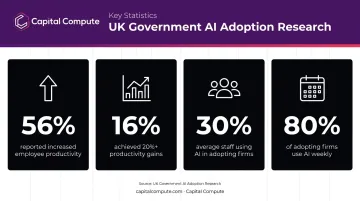
Australian government research on AI adoption found that:
- 56% of businesses using AI reported increased employee productivity
- 16% reported productivity gains of at least 20%
- AI was used by an average 30% of staff in adopting firms
- 80% of those firms used AI at least weekly
The same research shows only 16% of Australian private-sector businesses with five or more employees currently use AI — meaning early movers have a real competitive window before adoption normalises.
Accuracy and Consistency
Automated workflows don't have bad days, forget process steps, or introduce data entry errors. For businesses in regulated sectors — legal, finance, financial services — this consistency isn't just a productivity gain. It's a risk management tool.
Consistent audit trails and error-free document processing reduce the compliance exposure that manual processes build up over time.
The Scalability Advantage
This is where AI automation separates itself from traditional operational improvements. A workflow built to handle 50 customer enquiries per week can handle 500 with no additional labour cost. Manual processes don't work that way — growth requires proportional headcount, training time, and management overhead.
Businesses that build solid AI workflows gain compounding advantages across operational efficiency, customer responsiveness, and data quality. For Australian firms in regulated sectors — where compliance overhead is already high — that efficiency gap closes faster than most expect.
AI Automation in Regulated Sectors: Legal, Finance, and Marketing
Regulated sectors face a higher barrier to AI adoption: data sensitivity, audit trail requirements, and APP obligations mean standard off-the-shelf tools often aren't sufficient. The solution isn't to avoid AI automation — it's to architect it correctly before a single line of code is written.
Legal
LexisNexis research shows more than 50% of Australian legal practitioners have trialled generative AI tools, though trialling and embedded use are different things. The gap is partly cost, partly product fit — most tools weren't designed for small practice workflows.
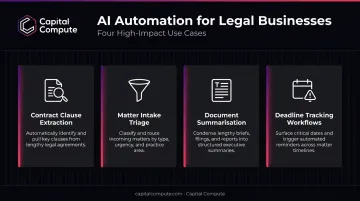
Practical AI use cases for legal businesses include:
- Contract clause extraction — identifying key terms, obligations, and risk flags automatically
- Matter intake triage — routing new enquiries by practice area, urgency, and conflict status
- Document summarisation — producing plain-English summaries of lengthy case files
- Deadline tracking workflows — alerting fee earners to upcoming court dates and filing windows
Any AI agent handling client matter data must operate within a clearly scoped, access-controlled environment. Confidentiality obligations don't disappear because the process is automated.
Finance and Financial Services
Common AI automation applications in finance include:
- Invoice processing — automated matching, approval routing, and exception flagging
- Payroll exception detection — surfacing anomalies before payroll runs, not after
- Spend anomaly monitoring — flagging unusual transaction patterns against defined thresholds
- Regulatory reporting preparation — structuring data outputs to meet reporting obligations
Any system handling financial data must be built on APP-compliant architecture from the discovery stage. Capital Compute scopes compliance requirements before any code is written — finance sector AI agents already in production reflect that approach.
Marketing
Marketing teams face the lowest barrier to AI automation entry. Practical applications include automated content workflows, campaign performance summarisation, lead scoring, and personalised email sequencing at scale.
Generic tools frequently hit integration limits when a business has proprietary data structures or existing platforms that don't connect cleanly via standard APIs. That's where custom-built automation — scoped around your actual stack — closes the gap.
Common Barriers to AI Automation Adoption and How to Overcome Them
Three barriers come up most often when Australian small businesses consider AI automation.
Barrier 1: Unclear ROI Before Committing Budget
Many would-be AI adopters stall not because of cost or expertise, but because they haven't identified a clear use case. Start by defining one measurable process before committing any budget. A pilot scoped around a single workflow — lead follow-up or document processing — produces results quickly and builds internal confidence before broader rollout.
Barrier 2: Integration Concerns
Most modern AI automation platforms integrate with common business tools via APIs. The complexity depends on how well-documented your existing systems are. Legacy software may require custom connector development — but that's a scoping question, not a blocker. It surfaces early in discovery, not after deployment.
Barrier 3: Disruption to Ongoing Operations
The concern that implementation will disrupt live operations is legitimate, but it's addressable with phased delivery. Start with a single workflow running in parallel with the manual process. Staff validate the output during the trial period, and the manual version is only switched off once confidence is established.
Barrier 4: the Privacy Act Compliance Uncertainty
The Privacy Act 1988 doesn't prohibit AI automation. It does require that any system processing personal data is built with lawful basis, data minimisation, and access controls in place from the start. ASIC's REP 798 found nearly half of licensees reviewed had no policies addressing consumer fairness or bias — compliance architecture must be present by design, not reviewed at go-live.
Each of these barriers has a defined resolution — and all four surface and get addressed during a proper discovery and scoping process, before a line of code is written.
How to Implement AI Automation in Your Small Business
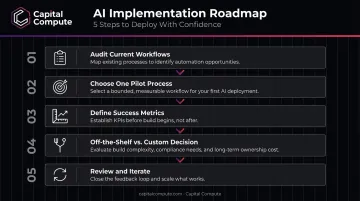
A Practical Sequence
- Audit current workflows — document your highest-frequency, most time-consuming manual tasks
- Choose one process for a pilot — pick something with clear inputs, outputs, and a measurable baseline
- Define success metrics before building — time saved, error rate, conversion rate, or processing volume
- Decide: off-the-shelf or custom-built — see below
- Review and iterate — assess the first sprint or deployment cycle before extending to other workflows
Off-the-Shelf vs. Custom-Built
The build-vs-buy decision shapes your cost, timeline, and flexibility for years — and it's harder to reverse than most teams expect.
| Situation | Best Fit |
|---|---|
| Standard workflow, common tools | Off-the-shelf (Zapier, Make, HubSpot AI) |
| Proprietary data structures | Custom-built |
| Regulated sector requirements | Custom-built |
| Legacy system integrations | Custom-built |
| Budget-constrained pilot | Off-the-shelf to start |
When your situation falls into multiple "custom-built" rows, off-the-shelf tools rarely hold up past the pilot stage.
Why Architecture Decisions Made Early Matter
A system designed to handle 50 users will need to be rebuilt — not upgraded — to handle 5,000 if scalability wasn't built in from the start. Getting senior engineering input at the discovery stage, rather than after the first scale event, avoids that cost entirely.
That's the premise behind Capital Compute's approach: architecture decisions that determine a system's ceiling are made by senior engineers in sprint one, not revisited after a growth event exposes the gap.
What to Look for in an AI Automation Partner
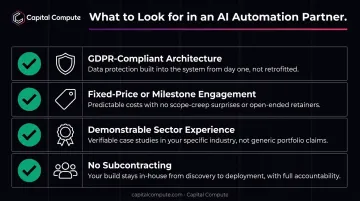
Evaluate any AI automation provider against these criteria:
- APP-compliant architecture from discovery — not reviewed at go-live, but locked in before development starts
- Fixed-price or milestone-based engagement — reduces financial risk; you know what you're paying before work begins
- Demonstrable sector experience — ask specifically about production systems delivered in your sector, not just general AI capability
- No subcontracting — many software firms outsource delivery, introducing inconsistency and accountability gaps; ask directly whether the engineers scoping your project are the ones building it
Of those four criteria, subcontracting is the one most worth pressing on — because it's also the easiest for a provider to obscure.
The Subcontracting Risk
The most common failure mode in software outsourcing is the senior team wins the project and junior contractors build it. Capital Compute delivers all AI automation work through an internal engineering team. The same engineers who conduct discovery remain on the retainer throughout — continuity is structural, not a promise made at the proposal stage.
Exit Clarity
A well-structured engagement should leave your business with documented APIs, versioned code, and the ability to maintain or extend the system independently. A month-to-month retainer structure with no lock-in gives small businesses the flexibility to scale up, pause, or transition ownership without penalty. Capital Compute operates on exactly this basis: scope is agreed sprint-by-sprint, and clients retain full ownership of the codebase and documentation from day one.
Frequently Asked Questions
How can I automate my business using AI?
Start by identifying the highest-frequency manual tasks in your business — email triage, lead follow-up, and document processing are common starting points. Choose one to pilot with an AI tool or custom-built workflow, measure the time or error-rate improvement, and expand from there once you have a baseline result.
Which is the best AI for small business?
The right AI depends on the use case. Off-the-shelf tools like HubSpot AI, Make, or Zapier suit standard workflows with no unusual integration requirements. Businesses in regulated sectors or with complex existing systems typically benefit more from a custom-built solution designed around their specific data and compliance needs.
Is AI automation expensive for small businesses?
Costs vary widely. Off-the-shelf tools carry low monthly fees and work well for standard use cases. Custom-built solutions require upfront development investment but deliver stronger ROI for businesses with specific workflows, compliance requirements, or systems that generic tools can't connect to reliably.
How does the Privacy Act affect AI automation for Australian businesses?
The Privacy Act applies whenever AI automation processes personal data — which it frequently does. Australian businesses must ensure lawful basis for processing, data minimisation practices, and appropriate access controls are built into the system architecture from the start. These aren't launch checklist items; they're design requirements.
Do I need a technical team to implement AI automation?
Not internally. Many off-the-shelf tools require no technical expertise to use. Custom-built solutions that integrate with existing software or handle regulated data require an experienced engineering partner — but that partner doesn't need to be on your payroll.
Can AI automation tools integrate with my existing software?
Integration complexity depends primarily on how well-documented and current your existing systems are. Standard platforms connect via APIs without difficulty. Legacy software may require custom connector development to enable reliable data flow — a scoping question that surfaces quickly in discovery.