The reality is more nuanced than most vendor marketing suggests. AI in software development is genuinely powerful for bounded, well-defined tasks — but getting consistent results requires the right tooling, structured prompts, clear review processes, and an honest understanding of where human judgement must override AI output.
This guide walks through how AI fits into each stage of the software development lifecycle, what you need before you begin, where it adds the most value in practice, and how to build habits that protect production quality over time.
Key Takeaways
- AI works best as a development collaborator, not a replacement — human oversight remains essential for architecture, security, and business logic.
- The highest-value use cases are code generation, automated testing, documentation, and debugging — not autonomous production development.
- Getting started means matching the right tooling to the right tasks, building a structured project knowledge base, and defining clear criteria for when to trust AI output and when to review it manually.
- In regulated industries, confirm Privacy Act compliance and data governance policies before feeding proprietary code or client data into cloud-based AI tools.
- Treat AI prompts like engineering specifications: specific, contextual, and iterated — not one-shot requests.
When Should You Use AI in Software Development?
AI tools add consistent value where tasks are well-defined, repetitive, or rely on broad pattern matching. They are considerably less reliable for novel architectural decisions, domain-specific business logic, or ambiguous requirements without a structured brief.
Where AI Clearly Belongs
- Greenfield projects (new builds from scratch) — scaffolding, boilerplate, and initial architecture patterns
- Rapid prototyping — generating working code quickly for validation
- Refactoring legacy code with clear specifications and defined output requirements
- Documentation at scale — function-level comments, API docs, changelog entries
- CI/CD pipeline monitoring — flagging anomalies and performance regressions
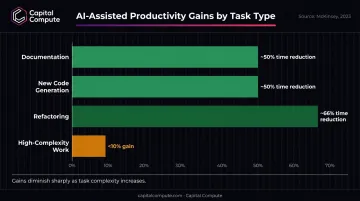
McKinsey's 2023 controlled study of more than 40 developers found documentation took ~50% less time, new code nearly 50% less, and refactoring nearly 66% less — but gains fell below 10% on high-complexity work. In other words, AI performs best when the problem is already well-scoped — which is precisely where misuse tends to begin.
Where AI Is Frequently Misused
Knowing where AI excels makes the failure modes easier to spot. Three patterns cause the most downstream damage:
- Accepting AI-generated code without review — speed gains evaporate when bugs reach production
- Using AI for security-critical functions without auditing — vulnerability rates in AI-generated code are measurable and well-documented (more on this below)
- Substituting AI for requirements analysis — when the underlying specification is vague, AI produces plausible-looking output that doesn't match the actual requirement
Stack Overflow's 2024 survey of 60,907 respondents found that 45% of professional developers rated AI tools bad or very bad at complex tasks. The 62% adoption rate cited in the same survey reflects usage breadth, not confidence in the outputs — a distinction worth keeping in mind before expanding AI's role in your development workflow.
What You Need Before Integrating AI Into Your Dev Workflow
Rushing to adopt AI tooling without these foundations in place produces inconsistent outputs, rework, and (in regulated sectors) compliance exposure.
Three Prerequisites
1. Define your project knowledge base first
AI tools perform best with structured context: your tech stack, architectural constraints, coding conventions, and project goals. Vague prompts produce generic outputs. Brief your AI assistant the way you'd brief a new senior engineer — with the same specificity you'd put in a technical spec.
2. Match tooling to task type
No single tool covers every development need. A practical baseline:
| Task | Recommended Tooling |
|---|---|
| Inline code assistance | GitHub Copilot, Cursor |
| Planning, documentation, architecture | Claude, GPT-4 |
| Security scanning and vulnerability detection | Snyk, Amazon CodeWhisperer |
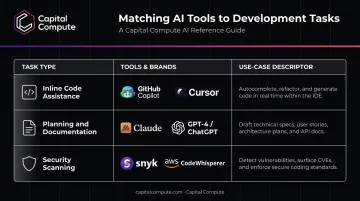
For reference, Capital Compute's dedicated team engagements use Cursor and GitHub Copilot as standard, specifically because they accelerate output without degrading documentation quality.
3. Confirm your data governance and the Privacy Act position
This is the prerequisite most teams skip. For Australian businesses in regulated sectors, confirm whether proprietary code, client data, or business logic can be shared with a cloud-based AI model before integration begins. Regulators such as the OAIC advise caution around putting sensitive information into public LLM queries, given obligations under the Privacy Act 1988. This is a compliance decision that belongs at scoping, not go-live.
How to Use AI Across the Software Development Lifecycle
The type of AI assistance — and the level of human oversight required — shifts significantly at each SDLC stage. Using the same approach across all phases, or skipping structured briefing, produces inconsistent outputs throughout delivery.
Planning and Requirements
AI accelerates planning by converting high-level business goals into structured user stories, identifying requirement gaps, suggesting feature prioritisation, and producing preliminary roadmaps. The constraint is real: AI predicts patterns from training data. It does not understand business intent. Stakeholder validation of AI-generated requirements is non-negotiable.
Common planning-stage error: Accepting AI-generated user stories or timelines without cross-checking them against real constraints — team capacity, regulatory requirements, integration complexity. This creates scoping problems that compound throughout the build.
Design and Architecture
AI can suggest system architecture patterns, database schema designs, API structures, and scalable UI layouts. Tools like Claude and GPT respond well to "think step-by-step" prompts that break down architecture trade-offs systematically.
Architecture decisions carry long-term consequences. AI suggestions must be validated and signed off by senior engineers, particularly in sprint one, where foundational decisions define the constraints of everything built after.
One practical use: generating Architecture Decision Records (ADRs) that document reasoning and trade-offs for future reference. AI produces the scaffolding; engineers supply the judgement.
Development and Code Generation
The core use case: real-time code completion, function generation from natural language prompts, refactoring suggestions, and automated documentation. GitHub Copilot, Cursor, and Claude Code all support repository-aware, multi-file workflows — each with different strengths in context handling and agent capabilities.
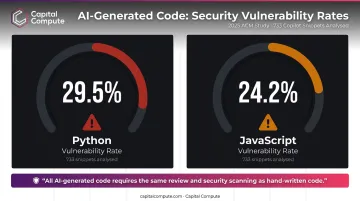
The critical caveat: AI-generated code must go through the same review, testing, and security scanning process as hand-written code. A 2025 ACM study analysing 733 Copilot-related snippets found security weaknesses in 29.5% of Python and 24.2% of JavaScript snippets present in public GitHub projects. These are not edge cases — they are a baseline risk that review gates exist to catch.
Testing and QA
For testing, context is everything. A 2024 study found 45.28% of Copilot-generated Python tests passed when existing test-suite context was supplied, versus 7.55% without it. AI generates test cases from user stories, identifies edge cases, and automates regression testing at scale — but supply neighbouring tests and project conventions, then validate every output.
Some testing cannot be automated. Current tools do not reliably replicate:
- Exploratory testing
- UX validation
- Accessibility review
- Business logic verification
These require human judgement throughout.
Deployment and Maintenance
AI contributes to CI/CD pipeline optimisation by monitoring deployment health in real time, predicting failure patterns, and flagging performance anomalies before they reach users. Post-deployment, it supports maintenance by surfacing refactoring opportunities, detecting performance regressions, and assisting with incremental legacy modernisation where full rewrites are not feasible.
One documented example: a combined Dynatrace-ServiceNow self-healing workflow achieved 98%+ lower MTTR and reduced downtime from 12 hours to 2 at CareSource. That result reflects a combined platform deployment, not AI monitoring alone. It does show what tightly integrated AI observability delivers when the toolchain is properly configured from the start.
Where AI in Software Development Is Already Making an Impact
AI-assisted development is delivering measurable results in production — not just in pilots. Adoption patterns differ by sector, but the use cases are now well-established:
- Legal tech: automated documentation, contract analysis tooling, and audit trail generation
- Finance: AI agents applied to compliance reporting and data pipeline automation
- Marketing tech: feature iteration acceleration and personalisation engines
Capital Compute has shipped production AI agents across all three sectors. In each case, APP-compliant data architecture was scoped at discovery — treating compliance as a first-sprint architecture decision, not a pre-launch checklist item. That distinction materially reduces regulatory risk for Australian businesses in regulated industries.
The productivity picture at the developer level is more nuanced. Controlled studies show wide variance:
- GitHub's Copilot study (95 developers) found a specific task completed 55% faster by the AI-assisted group
- McKinsey found gains varied sharply by task complexity and developer experience level
- Junior developers in McKinsey's study sometimes took 7–10% longer with AI than without it
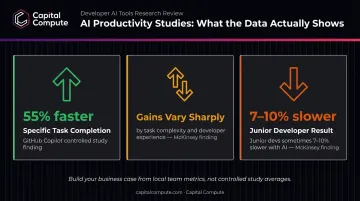
These results come from controlled conditions. Build your business case from local data — cycle time, escaped defects, and review-rework metrics specific to your team.
Where Gaps Remain
AI adoption in development still has meaningful limitations:
- Large legacy codebases with inconsistent or absent documentation — AI suggestions degrade without good context
- Proprietary languages or niche frameworks with limited training data — output quality drops noticeably
- Highly regulated environments where AI output cannot be independently audited to the required standard
Best Practices for Using AI in Software Development Effectively
Treat prompts like engineering specifications. Include the tech stack, relevant constraints, prior architectural decisions, and the specific output required. Context-rich prompts produce consistently better results than open-ended requests.
Build a code review gate for all AI-generated output. AI should never bypass version control, automated testing pipelines, or security scanning. Treat AI-assisted commits the same way you would treat any external contribution: review, test, approve.
Maintain human ownership of architecture and security decisions. AI can propose patterns and generate scaffolding, but senior engineers should make and document the final structural calls — particularly in sprint one, where those decisions define the constraints of everything built after.
Use AI iteratively across the full development cycle. Prompt, review, refine, re-prompt. Back-and-forth iteration produces more reliable output than single large requests and catches errors before they propagate through a codebase.
For Australian businesses in regulated sectors, verify your AI tooling against APP obligations before using it with client data, PII, or proprietary business logic. Where data sensitivity is high, evaluate on-device or privately deployed LLM options. Make this assessment during project scoping — not after launch.
Frequently Asked Questions
Can I use AI to develop software?
Yes — AI tools can generate code, automate testing, and assist across the SDLC. Human oversight remains essential for production software, particularly around security, architecture, and business logic that AI cannot independently validate.
Which AI is best for software developers?
The best tool depends on the task. GitHub Copilot and Cursor for inline code assistance, Claude or GPT for planning and documentation, Amazon CodeWhisperer for security-conscious code review, and Snyk for vulnerability detection. No single tool covers every development need.
Will AI replace software developers?
AI augments developers rather than replacing them. It handles repetitive and pattern-based tasks well, but software engineers remain essential for system design, business logic validation, and building software that meets real-world requirements reliably.
What are the risks of using AI in software development?
AI-generated code can introduce security vulnerabilities if not reviewed, models reflect biases in their training data, and over-reliance without proper review gates leads to technical debt, inconsistent code quality, and maintainability problems over time.
Is AI-generated code safe for production use in regulated industries?
AI-generated code requires additional scrutiny in regulated sectors. Privacy Act compliance, data governance, and independent security auditing must all be confirmed before cloud-based AI tools are used with proprietary code or client data. That assessment belongs at scoping — not go-live.
How do I start using AI tools in my development workflow?
Start with a well-established IDE-integrated tool, define a structured project knowledge base to give the AI consistent context, and put a code review gate in place before any AI-generated output reaches production.