Hybrid development blends web technologies, HTML, CSS, and JavaScript, with a native container that app stores accept the same way they accept a fully native app. One codebase, two platforms. That's the pitch, and this guide tests whether it holds up in practice.
Over the next few sections, we'll define hybrid apps properly, unpack how they're actually built, compare them honestly against native, web, and cross-platform approaches, walk through real costs, and look at where the model breaks down. This guide is written for founders, product owners, and technical decision-makers weighing their first (or fifth) mobile build.
Key Takeaways
- One shared codebase covers iOS and Android, cutting build time and cost versus native apps
- Modern frameworks like React Native and Flutter have largely closed the old WebView performance gap
- Separate native builds can roughly double project price compared with one shared codebase
- Native still wins for gaming, AR/VR, and deep hardware work, while hybrid suits MVPs and budget-conscious launches
- Capital Compute scopes hybrid builds with fixed-price milestones and Privacy-First architecture from day one
What Is a Hybrid Mobile App?
Developers build a hybrid mobile app using standard web technologies, HTML, CSS, and JavaScript, then wrap it inside a native container so it installs and runs like any other app from the App Store or Google Play. Users can't tell the difference from the icon on their home screen.
Hybrid apps sit in the middle of a spectrum. On one end, fully native apps are written in platform-specific languages with direct hardware access. On the other, pure web apps run entirely in a browser with no app store presence. Hybrid apps borrow the distribution of native, installable and app-store-listed, while keeping the internal code largely web-based.
How Hybrid Apps Are Built
Every hybrid app relies on three moving parts:
- The web layer: UI and business logic rendered inside a WebView, the same engine that powers your phone's browser
- The native bridge: APIs and plugins connecting the web code to device hardware
- The container shell: the native wrapper that packages everything into an installable app-store binary
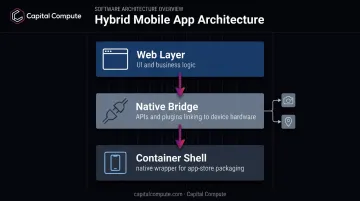
Plugins make this work in practice. They expose native device features, camera, GPS, contacts, push notifications, to code that would otherwise be stuck inside a browser sandbox.
From Heavy WebViews to Near-Native Rendering
Early hybrid frameworks like Cordova and PhoneGap leaned hard on the WebView for everything, which is why hybrid apps earned a reputation for feeling sluggish. That reputation is dated.
React Native's 2024 architecture update removed the old JavaScript bridge entirely, replacing it with direct communication between JavaScript and native code. Flutter never used a WebView for its UI in the first place; it compiles Dart to machine code and renders through its own engine.
One naming quirk worth flagging: "hybrid" and "cross-platform" get used interchangeably in most marketing copy, but they're not identical. Classic hybrid apps run your interface inside a WebView.
React Native and Flutter render actual native UI components or control their own rendering engine. No WebView is involved for the interface itself. Don't let the terminology dictate your framework choice.
Hybrid vs. Native vs. Web vs. Cross-Platform Apps: Key Differences
Before picking a build approach, it helps to know what each term actually means.
- Native apps are written in platform-specific languages, Swift or Objective-C for iOS, Kotlin or Java for Android, with direct access to every OS feature the day it ships
- Hybrid apps wrap a single HTML/CSS/JavaScript codebase inside a native shell, reaching both app stores from one build
- Cross-platform apps compile a single codebase (React Native, Flutter) into near-native UI components, skipping the WebView layer hybrid apps rely on
- Web apps run entirely in a browser. No app store listing, no install, and no hardware access beyond what the browser permits
Cost, Performance, and Maintenance
Native development means building and maintaining two separate codebases, one per platform. Hybrid and most cross-platform frameworks let a single codebase serve both, which matters when separate native builds can roughly double overall project cost compared with one shared codebase (covered in more detail below).
Performance tells a similar story, with more nuance. Native apps get full platform optimisation from day one, while hybrid apps come close through bridges and plugins.
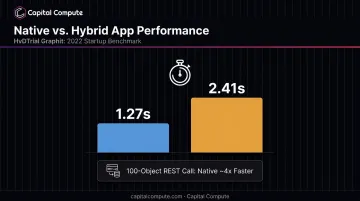
A 2022 benchmark comparing native and Ionic apps found native starting up in 1.27 seconds against 2.41 seconds for Ionic, and processing a 100-object REST call roughly four times faster. Web apps sit furthest from hardware, limited to whatever the browser exposes.
Maintenance carries a similar trade-off forward. Hybrid bug fixes and feature updates deploy once and reach both platforms together. Native updates need separate App Store and Play Store review cycles, doubling the release admin.
Comparison at a Glance
| Approach | Platform Support | Performance | Dev Cost | Best-Fit Use Case |
|---|---|---|---|---|
| Native | iOS or Android only per build | Full optimisation | Highest (two builds) | Gaming, AR/VR, deep OS integration |
| Hybrid (Cordova-style) | iOS + Android, one codebase | Good for content apps; WebView overhead on heavy tasks | Lowest | MVPs, internal tools, content apps |
| Cross-platform (React Native/Flutter) | iOS + Android, one codebase | Near-native, no WebView UI layer | Low-to-moderate | Most consumer and B2B apps |
| Web/PWA | Browser only | Limited by browser sandbox | Lowest | Reach-first, no install friction |
By 2025 and 2026, the line between "hybrid" and "cross-platform" matters less than the specific framework you pick. React Native and Flutter have effectively absorbed most of what hybrid used to promise, minus the classic WebView tax.
Advantages and Disadvantages of Hybrid App Development
Advantages of Hybrid Apps
Cost efficiency is the headline reason founders choose hybrid. One codebase means one team and one QA pass instead of duplicating both for a second platform. Clutch's 2026 pricing analysis, built from verified client reviews, found that commissioning separate native iOS and Android apps roughly doubles the overall project price compared with a single shared build.
Faster time-to-market follows directly from that shared code. Startups validating an MVP can launch on both app stores simultaneously instead of staggering an iOS release months ahead of Android, buying real runway for user feedback before the next funding conversation.
Easier long-term maintenance rounds out the case. Bug fixes and new features get built once and pushed to both platforms together, rather than written, tested, and shipped twice by two separate teams.
Disadvantages of Hybrid Apps
Performance limitations still exist, even with modern frameworks. Android's own developer documentation warns that WebView components can be memory-intensive and, if not managed carefully, can cause visible lag, particularly in graphics-heavy or resource-intensive screens.
UI/UX consistency depends on developer discipline more than the framework itself. Hybrid tools give developers the flexibility to build one UI for both platforms, but iOS and Android users expect different interaction patterns. Skipping platform-specific guidelines produces an app that feels foreign on one operating system.
Testing complexity increases too. A hybrid app mixes native and web code, so QA has to cover:
- Multiple device manufacturers and screen sizes
- Different OS versions on both iOS and Android
- WebView rendering quirks that vary by device
- Native plugin behaviour across hardware configurations
That's a wider test matrix than a single native codebase, even though the underlying app is theoretically "one build."
Popular Hybrid App Frameworks and Real-World Examples
Top Hybrid App Frameworks to Know
- React Native: Meta-backed, renders actual native UI components rather than a WebView. Its 2024 architecture update removed the old bridge for direct native communication
- Flutter: Google's Dart-based framework with its own rendering engine, giving tight control over UI consistency across platforms
- Ionic/Capacitor: Web-first, using HTML, CSS, and JavaScript with native plugin access, closest to the classic hybrid definition
- Apache Cordova: The original hybrid framework. Adobe retired its PhoneGap variant in 2020, and most new projects now use Capacitor or another cross-platform framework instead
Framework choice depends on three things: how performance-sensitive the app is, what your team already knows, and how deep into native device features you need to go. Capital Compute's engineering team, for instance, selects between React Native, Flutter, Swift, and Kotlin based on the specific project brief rather than defaulting to whichever framework feels comfortable.
Real-World Examples of Hybrid Apps
- Instagram uses React Native for parts of its app, which lets teams build rich animations and novel interactions faster than a fully native rebuild would require
- Discord runs its mobile clients on React Native and completed an Android migration in 2022. By 2023, Discord had halved median mobile startup time, with heavy users seeing 14% lower startup memory use
- Uber migrated its UberEATS Restaurant Dashboard from a native-plus-WebView setup to React Native, cutting feature delivery time from weeks to days
None of these companies rebuilt their entire app in a hybrid framework overnight. Each picked specific screens or products where shared code paid off, then measured the result, which is the same disciplined approach worth applying to a smaller build.
How Much Does Hybrid App Development Cost?
Hybrid app costs swing widely based on feature complexity, design ambition, and framework choice. There's no single number that fits every project, but current market data gives a useful range.
Business of Apps' 2026 research puts general app development at:
- Simple apps: $5,000–$50,000, delivered in 2–4 months
- Medium-complexity apps: $50,000–$120,000, delivered in 4–6 months
- Complex apps: $120,000–$300,000, delivered in 9–12 months
These figures reflect global market averages in USD rather than an Australian-only quote, so treat them as a planning range.
The savings case for hybrid comes from avoiding duplicate work. Building separate native iOS and Android apps roughly doubles the overall project price compared with a single shared codebase. That's the real driver behind hybrid's popularity with cash-conscious founders, not a marketing claim.
What Actually Drives the Price
- Number of features and integrations: payment gateways, third-party APIs, and custom logic all add build time
- UI/UX design complexity: custom animations and platform-specific polish cost more than template layouts
- Backend infrastructure: a simple CRUD app costs far less than one needing real-time sync or complex data pipelines
- Post-launch maintenance: OS updates, dependency upgrades, and bug fixes continue long after launch
Capital Compute quotes Australian clients with a fixed-price estimate within two business days of a scoping call, so there's no guessing between broad market ranges and what a specific build will cost.
Is Hybrid App Development Right for Your Business?
Hybrid makes sense when:
- Budget covers one build, not two parallel native teams
- iOS and Android need to launch simultaneously, not staggered
- Feature complexity is moderate: content apps, marketplaces, booking tools, internal dashboards
- You're validating an MVP for a new SaaS product and need real user feedback before committing to a bigger spend
Native is the better call when:
- Performance is the product: gaming, AR/VR, or anything frame-rate sensitive
- The app leans heavily on specific hardware, advanced camera control, or sensor fusion
- You need the deepest possible OS integration the moment a platform ships a new capability
Most B2B and SaaS founders land in the first list, which is where a specialist team earns its fee.
Capital Compute works as a software development outsourcing partner for Australian businesses that need experienced JavaScript and mobile engineers without hiring a full in-house team. Hybrid and cross-platform builds run on fixed-price milestones, agreed in writing before each sprint starts, with APP-compliant architecture scoped at discovery rather than bolted on before launch.
The senior engineers who design the architecture in sprint one are the same ones who stay through handover and any ongoing retainer work. That continuity matters more than it sounds.
A team that didn't make the original architectural decisions has to reverse-engineer them before safely extending or fixing the app. This is the onboarding tax outsourced projects usually pay twice. If your team is weighing this build, a scoping call is the fastest way to get a fixed-price estimate against your actual feature list.
Frequently Asked Questions
What is a hybrid mobile app?
A hybrid mobile app wraps web-based code, HTML, CSS, and JavaScript, inside a native container so it installs and runs from app stores like a fully native app. One codebase serves both iOS and Android.
What is an example of a hybrid app?
Instagram uses React Native to power parts of its interface, and Discord relies on it for its mobile clients. Uber went further, migrating its UberEATS Restaurant Dashboard from a native-plus-WebView setup to React Native.
How much does a hybrid app cost?
Costs depend heavily on feature complexity: simple apps typically start around A$25,000, while complex multi-platform builds can reach A$500,000. Separate native builds roughly double that cost.
Are hybrid apps slower than native apps?
Marginally, in specific workloads. Native apps tend to start up faster than WebView-based hybrid apps like Ionic, but modern frameworks like React Native and Flutter have largely closed that gap for most everyday screens.
What are the main disadvantages of hybrid apps?
WebView-heavy apps can lag on graphics-intensive screens. UI consistency also suffers without disciplined platform-specific design, and QA becomes more complex across mixed native and web code.
Which framework is best for hybrid app development?
It depends on your project's performance needs and team skills. React Native and Flutter are the leading choices for most modern builds, with Ionic/Capacitor still relevant for web-first teams.